





Call Us Toll-Free: (888) 727-4858

Buy PC Supplies

Engrave Your Current Laptop/Notebook

Step 1: Choose Language
»  Choose Language
»  Choose Engraving Color
»  Complete Checkout!
Step 2: Package Notebook
»  Send us Notebook
»  Engraving Process Completed
»  We Ship Back To You
Step 3: Receive Completed
»  Delivered To Your Home
»  No Mess with Glue
»  Clean and Professional
Albanian
Albania
Spanish
Argentina
German
Austria
Cyrillic
Azeri
Latin
Azeri
Arabic
Bahrain
Belarusian
Belarus
French
Belgium
Dutch
Belgium
Spanish
Bolivia
Bosnian (Latin)
Bosnia
Cyrillic
Bosnia
Serbian (Latin)
Bosnia
Croatian
Bosnia
Portuguese
Brasil
Bulgarian
Bulgaria
French
Canada
English
Canada
Spanish
Chile
Chinese
China
Spanish
Colombia
Spanish
Costa Rica
Croatian
Croatia
Czech
Czech Republic
Danish
Denmark
Spanish
Dominican Republic
Spanish
Ecuador
Spanish
El Salvador
Estonian
Estonia
Finnish
Finland
Sami Skolt
Finland
Swedish
Finland
Sami Northern
Finland
Sami Inari
Finland
French
France
Macedonian
FRYO Macedonia
German
Germany
Greek
Greece
Spanish
Guatemala
Spanish
Honduras
Hungarian
Hungary
Icelandic
Iceland
Bengali
India
Gujarati
India
Hindi
India
Kannada
India
Konkani
India
Malayalam
India
Marathi
India
Punjabi
India
Sanskrit
India
Syriac
India
Arabic
Iraq
English
Ireland
Hebrew
Israel
Italian
Italy
Japanese
Japan
Arabic
Jordan
Korean
Korea
Arabic
Kuwait
Cyrillic
Kyrgyzstan
Arabic
Lebanon
Lithuanian
Lithuania
German
Luxembourg
French
Luxembourg
Maltese
Malta
Spanish
Mexico
French
Monaco
Cyrillic
Mongolia
Dutch
Netherlands
Spanish
Nicaragua
Norwegian (Nynorsk)
Norway
Norwegian (Bokmaz)
Norway
Sami, Lule
Norway
Sami Northern
Norway
Sami Southern
Norway
Arabic
Oman
Spanish
Panama
Spanish
Paraguay
Spanish
Peru
Polish
Poland
Portuguese
Portugal
Spanish
Puerto Rico
Arabic
Qatar
Romanian
Romaina
Russian
Russia
Tatar
Russia
Arabic
Saudi Arabia
Slovak
Slovakia
Slovenian
Slovenia
Spanish
Spain
Catalan
Spain
Basque
Spain
Swedish
Sweden
Sami Lule
Sweden
Sami Northern
Sweden
Sami Southern
Sweden
French
Switzerland
Italian
Switzerland
German
Switzerland
Arabic
Syria
Thai
Thailand
Turkish
Turkey
Arabic
U. A. E.
Ukrainian
Ukraine
English
United Kingdom
English (US)
United States
Spanish
Uruguay
Latin
Uzbekistan
Cyrillic
Uzbekistan
Spanish
Venezuela
Welsh
Wales
Arabic
Yemen
Choose Engraving Country/Language:
 
Currently Showing Layout For:
 Language ()
Choose a Language from the drop-down menu above
to view layout and to add to cart!
Mouse mouse over image to zoom, click to enlarge.
Simulated image. Actual positions, colors, sizes may vary slightly.
Choose Color To Engrave:
Quantity:
Country:
Language:
Engraving Color:
Price: $126.95
Browse sample engravings!
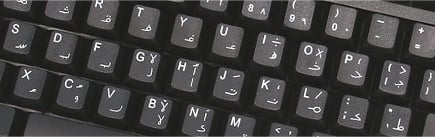
German Engraving on Sony Laptop
  • Image01
  • Image02
  • Image03
  • Image04
  • Image05
  • Permanent engraving technology means characters won't wear or fade over time. Includes lifetime warranty.
  • Cleaner, simpler, more professional than stickers that get sticky, fade, and peel off.
  • Engraving available in a variety of colors.
  • Dozens of languages and dialects available.
  • Contact us for custom language requirements.
  1. Can I engrave more than one language on my laptop?
    Yes! We can engrave up to three languages on your keys, depending on the languages and the laptop. Most languages have just one character per key, and we can fit up to three additional (plus English) onto a key. Some languages have multiple characters on each key, and we would only be able to engrave two languages on a laptop. To engrave more than one language, please contact us.
  2. Why is engraving better than stickers?
    The engraving process is permanent and won't ever wear off the keys. Oil from your fingers, friction from typing, and heat from the keyboard and environment loosens glue from stickers. Stickers begin to curl, become sticky, and look like a mess on your keyboard. Engraved keys, on the other hand, are permanently lasered into keys, use no adhesives, and last forever with a lifetime warranty.
  3. How long will the engraving last?
    The engraving technology we use is permanent. Keys will never fade or wear away. We offer a lifetime guarantee on the engraving for your assurance.
  4. Can you engrave my netbook?
    Yes, we have successfully engraved dozens of netbooks as well. You can achieve the functionality and the same clean, professional look for your netbook.
  5. What colors can I have engraved?
    We offer a number of different colors for our engraving. We recommend you choose a color that contrasts the original English letters, as well as contrasting the color of the keys. For black keys, we offer a yellow, white, light blue, or orange engraving. For a white keys, we offer a green, blue, or black engraving. Additionally, for multiple languages being engraved, we would recommend a different color for each additional language for easy visual recognition and distinction.
  6. I'd like to see some sample pictures of previous engravings you have done.
    We have put up dozens of pictures of previous engravings of many different languages for you to see. Click here to browse some of our completed engravings.
  7. Can I purchase a new keyboard instead?
    Absolutely, please view our Multi-Language Engraved Keyboards page.
  8. Can I use a keyboard skin with the keyboard?
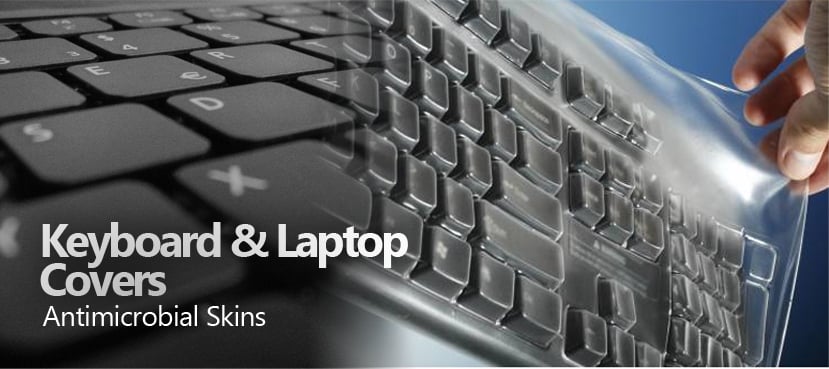
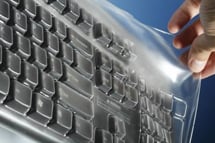
    Absolutely. We offer keyboard skins for thousands of laptops. The skins help protect the keyboard while typing.
  9. How do I use the different languages on the keyboard?
    To use the different languages in Windows XP, simply use the built-in language bar to switch between languages. Windows allows you to set up a "hotkey" to quickly switch between multiple languages without taking your hands off the keyboard. For instance, one can use Alt + Shift to rotate between the languages on your keyboard. Alternatively, one can use the dropdown menu included with the language bar to switch between any languages on your keyboard. Linux and Mac OS operating systems include similar functionality to switch between languages.
  10. How can I set up a hotkey to switch between languages?
    To setup a hotkey in Windows XP, go to Control Panel and "Regional and Language Options". Under the Language tab, click Details. Under the "Key Settings" button, you can setup different hotkeys for cycling through languages, as well as hotkeys to jump directly to a specific language. Other operating systems have similar mechanisms available.
  11. My language isn't shown here. Can you engrave it for me anyway?
    Yes, we can engrave custom languages for you. Many users require a specific keyboard layout or dialect that we don't show here, but we can still provide for you. Please contact us and we can help you with your specific language or dialect.
Buy PC Supplies, LLC
30-10 Norwood Drive, Fair Lawn, NJ 07410
Phone: (888) 727-4858    |    Fax: (888) 735-7282

© Copyright 2012, Buy PC Supplies, LLC. All Rights Reserved.
Buy PC Supplies, LLC is a BBB Accredited Business. Click for the BBB Business Review of this Computers - Supplies & Parts in Fair Lawn NJ
SecurityMetrics for PCI Compliance, QSA, IDS, Penetration Testing, Forensics, and Vulnerability Assessment